eWebinar Update: Salesforce Integration

Todd Parmley




A webinar series is a sequence of webinars organized around a central theme or topic, where each session builds on the last. There are typically two ways series are done:
1. Thought leadership events with subject matter experts.
These are usually one-time special events with a number of guest speakers who host discussions on a variety of topics over the course of a few days or weeks
These are typically hosted with live webinar software, and three platforms stand out that support this: BigMarker, Zoho Webinar, and ON24. They let you create a multi-session event and a corresponding registration page, so attendees can sign up once and access the full series.
If this is what you need, skip ahead to where we describe these three platforms in greater detail.
2. Structured onboarding, training, or learning experiences.
These are usually designed for new customer or client onboarding, in-depth product tutorials, employee trainings, or educational courses. They’re meant to be given repeatedly to new audiences.
These are best managed with automated webinar software because it lets you pre-record interactive trainings and reuse them for every audience. And as of this writing, eWebinar is the only automated webinar software that truly supports this.
Not only does our platform let you string together multiple webinars into one cohesive flow, but it also includes:
Webinar controls — like action items, quizzes, or mandatory watch times — to ensure participants understand the key takeaways from each session before moving forward.
Asynchronous live chat for participants to easily connect with your team if they have questions throughout the series.
Certificates for participants who complete the series successfully.
Personalized training pages for participants to monitor their progress, replay their sessions, view completion certificates, and reference past chat conversations.
Registration page builders to create a single landing page where users can enroll in the entire series and gain access to all webinars.
We developed the Webinar Series module because a solution like this didn’t exist in the market.
To give you some backstory on this feature…
Many of our customers came to us wanting to create multi-webinar trainings they could automate and deliver on demand. They didn't want just to share a handful of individual webinars and hope users were actually watching everything and absorbing what they needed to learn. They needed ways to verify understanding, answer questions as they arose, and track who had actually completed the series. They also wanted attendees to be able to track their own progress from one place and work toward certification.
However, existing automated webinar tools didn't support any of this. At best, they offered the same basic benefit as live webinar software — combining multiple webinars into a single registration page and giving attendees access to all sessions in a collection. But, that's not structured learning. It's just letting attendees loose with a bunch of webinar links. There's no easy way to know if people watch them all, pay attention, or absorb the material.
We built Webinar Series to solve these exact problems.
We’ve compiled this guide to explain how our solution works and its unique features. If you’d like to learn more about Webinar Series after reading, you can start a 14-day free trial to explore the complete toolkit and build your first series.
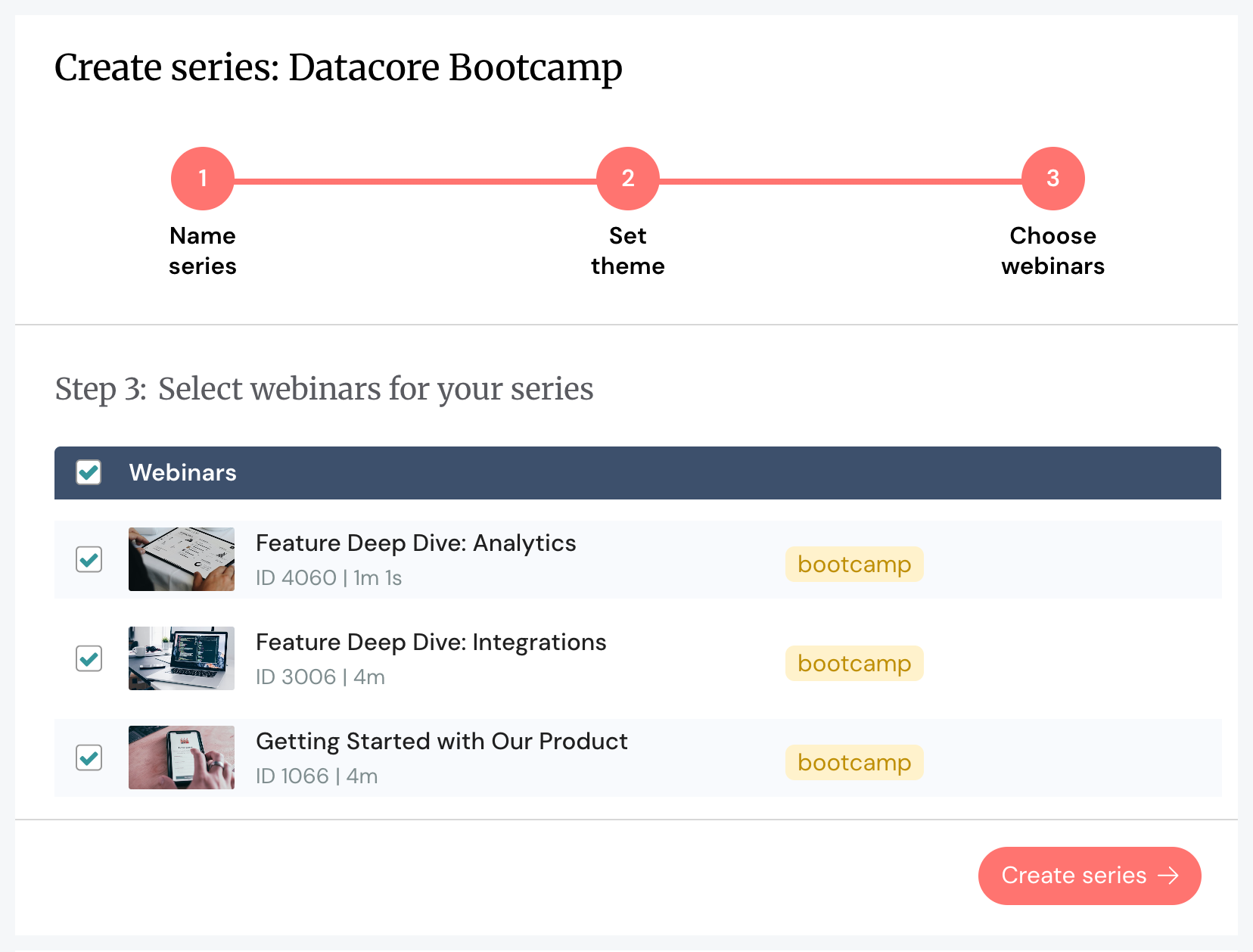
Creating a webinar series in eWebinar is straightforward enough that anyone can pull together a professional series in under an hour — there is absolutely no video editing or technical skills required. You simply choose the webinars you want to include in your series, and the order in which you want participants to view them.
You have two options for building this flow:
Manually select webinars — Hand-pick which webinars to include in your series, arranging them in whatever order makes sense for your training flow.
Pulling webinars by tag — If you've already tagged your webinars (for example, "Product Onboarding" or "Advanced Features"), you can create a series in seconds by selecting all webinars with a specific tag. This is especially useful if you're managing multiple series or frequently updating content.
Now, if you don't already have pre-recorded webinars in eWebinar, our webinar builder makes it easy to upload and build out webinars to include in your series. Here are the key steps:
Start with a template or build a webinar from scratch — We provide templates for onboarding, training, product releases, sales, marketing, and more. We also have templates for various languages.
Set your webinar goal — Specify what action you want participants to take at the end (e.g., use a feature in your SaaS product, watch the next webinar, schedule a follow-up meeting with your CS team).
Name your webinar — Give it a clear, descriptive title that tells participants what they'll learn.
Choose your event type — Decide how often the webinar plays. For series, most teams enable on-demand viewing, allowing participants to watch webinars as soon as they're ready and progress through the series at their own pace.
Add your branding — Upload your logo and choose custom colors that match your brand. You only need to do this once, and then eWebinar saves these for all future webinars.
Upload your recording — Add a video file from your device, import a recording directly from Zoom, Vimeo, or Descript, or include a link from a video-hosting site.
Plug in interaction features — Aside from action items and quizzes, eWebinar lets you pre-program a wide variety of interactions to keep users engaged in your webinar experiences. Our interactions gallery offers over 20 engagement tools, including surveys, polls, feedback requests, testimonials, special offers, and private messages.
Note: While we generally recommend making series available on demand so participants can jump in at any time and move at their own pace, you can also combine scheduling options to accommodate different needs. For example, you could set a recurring schedule for users who want to sign up for scheduled sessions, while still offering on-demand access for participants who prefer to watch immediately.
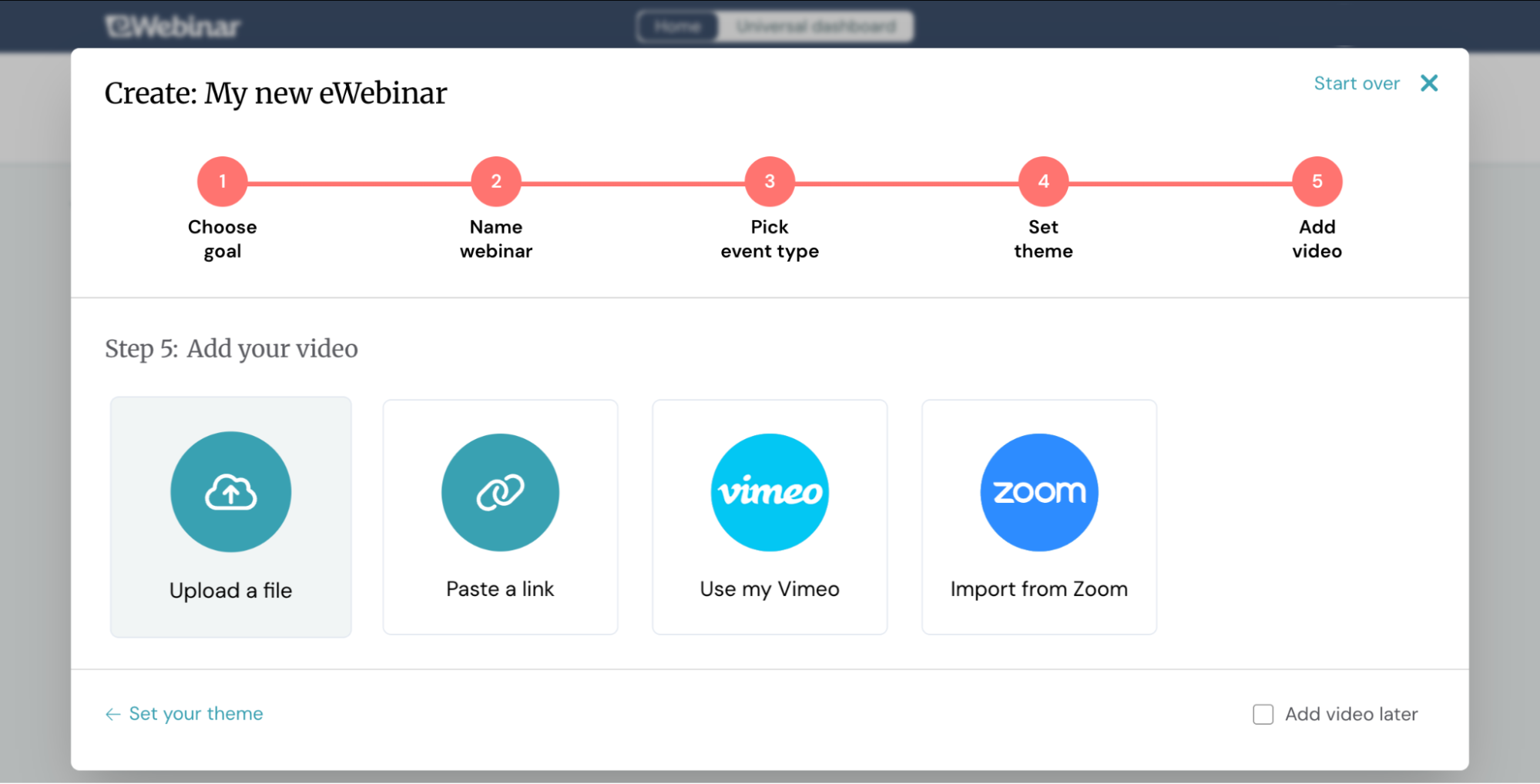
You can edit your series at any time — add new webinars, remove outdated ones, or reorder sessions as needed.
Beyond covering all the baseline requirements we outlined above, eWebinar's Webinar Series goes further with webinar features that give you absolute control over the learning experience, one-on-one communications with participants, and detailed insight into how webinars are performing and participants are engaging.
eWebinar’s AI-powered page builders automatically create professional registration pages for your series — complete with design and branding. All you have to do is add the copy.
You can share these pages on your website or in email campaigns.If you are a SaaS brand offering webinar series to streamline product training, you can link your training directly in your product and allow users to join when signing up for your system.
The key benefit here is that participants only register for the entire series once. You don't have to send five different links for five different webinars. After signing up, they gain access to all webinars — eliminating the need to fill out registration forms for each session.
Then, participants can return to their dedicated training page (below) that keeps track of their progress for them. For example, in any follow-up emails, you can include a link that takes people back to the series landing page, where they can easily see where they’re at and join the next webinar.
Note: Once a participant registers, all of their contact info and engagement data are automatically sent over to a CRM like HubSpot (via eWebinar integrations), helping you to prioritize and segment customers, guide product marketing campaigns, and assist long-term follow-ups.
Every participant gets their own personalized training page, which serves as their home base for the entire series. From this hub, they can:
Access all webinars and replays — Watch all series sessions and revisit replays whenever they need a refresher.
Monitor their progress — A progress bar at the top of the page shows exactly where they are in the series; they can also see which webinars they've completed and what's still ahead.
Reference chat conversations — All conversations with your team are saved here, allowing participants to review answers to their questions at any time.
View completion certificates — Once they finish the series, their certificate is available right in their hub for easy download.
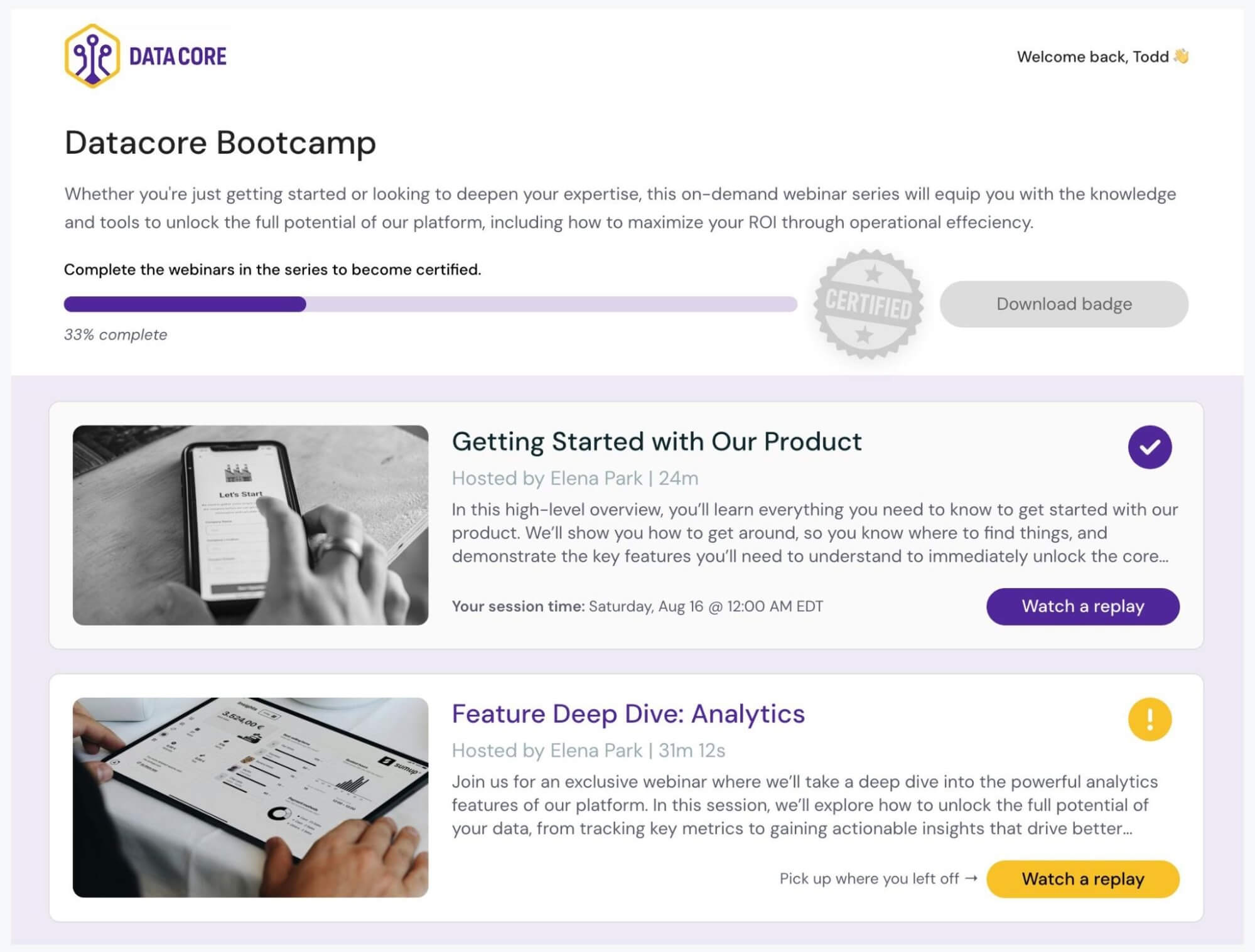
Users can always return to their dedicated training page and pick up where they left off. It eliminates confusion about where they are in the training, what they need to do next, and where to reference important information. Everything is organized neatly in one place.
eWebinar’s chat feature is available throughout your entire webinar series, providing participants with a direct line to your team whenever questions arise. What makes our chat unique is its asynchronous model — moderators can respond in real time if they're available, or get back to participants later if they're not.
When participants send a message during a webinar and you're online, you can respond and have the conversation in real-time. You can reply through the chat admin (which is mobile-friendly) or Slack.
However, if you're unavailable, eWebinar sends an automatic response letting them know you'll get back to them soon.
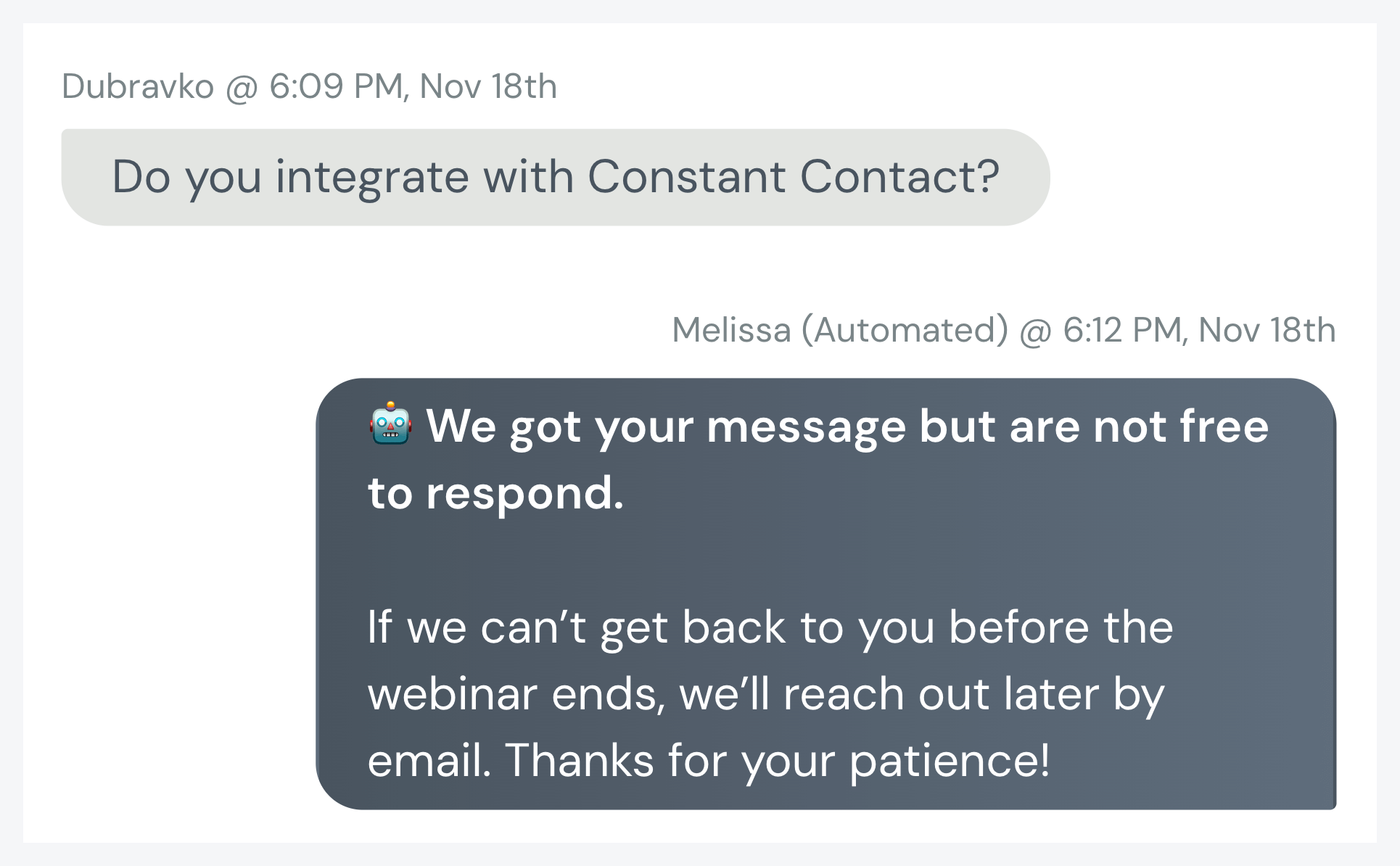
Replies sent later are delivered directly to participants' emails, and all chat conversations are saved in their personal hub, allowing them to reference them at any time.
This means participants never feel ignored, and you're never stuck monitoring chat 24/7.
You can also assign multiple team members as moderators, so that no single person is tasked with responding to all participant questions.
Another notable differentiator is our ability to set actual requirements between webinars. You're not just hoping participants complete each session — you can actually verify they've engaged with the content before they move forward.
You can require participants to:
Complete action items — Prompt participants to perform specific tasks between webinars, like using a product feature, reviewing a document, or practicing what they've learned. They can't advance until they've checked off the task.
Pass quizzes — Test comprehension by requiring participants to complete quizzes and achieve a specific score or accuracy percentage before moving to the next session. This ensures they're truly absorbing the material, not just passively watching.
Meet minimum watch times — Set minimum watch times for webinars. This prevents people from skipping through content without engaging with it.
These controls enable you to create a structured learning path where participants demonstrate actual understanding, rather than simply clicking "next" through a series of videos.
When participants finish your series, you can reward them with completion certificates. We provide simple, professional certificates built into the system, or you can design and upload your own branded certificates.
Certificates gamify the experience and motivate users to complete trainings, as many users want that completion badge to show they’ve leveled up. But they aren't just about recognition; they're also useful for credentialing programs, professional development courses, or any situation where participants require proof of completing the training.
You can also offer rewards by including links to gift cards, discount codes, or other incentives. When participants complete the series, they'll receive access to the reward link, where they can claim the offer you're providing.

eWebinar includes a Universal Dashboard that tracks performance and engagement analytics across your entire webinar series. Each series receives its own dedicated dashboard.
Our cross-webinar analytics allow you to see:
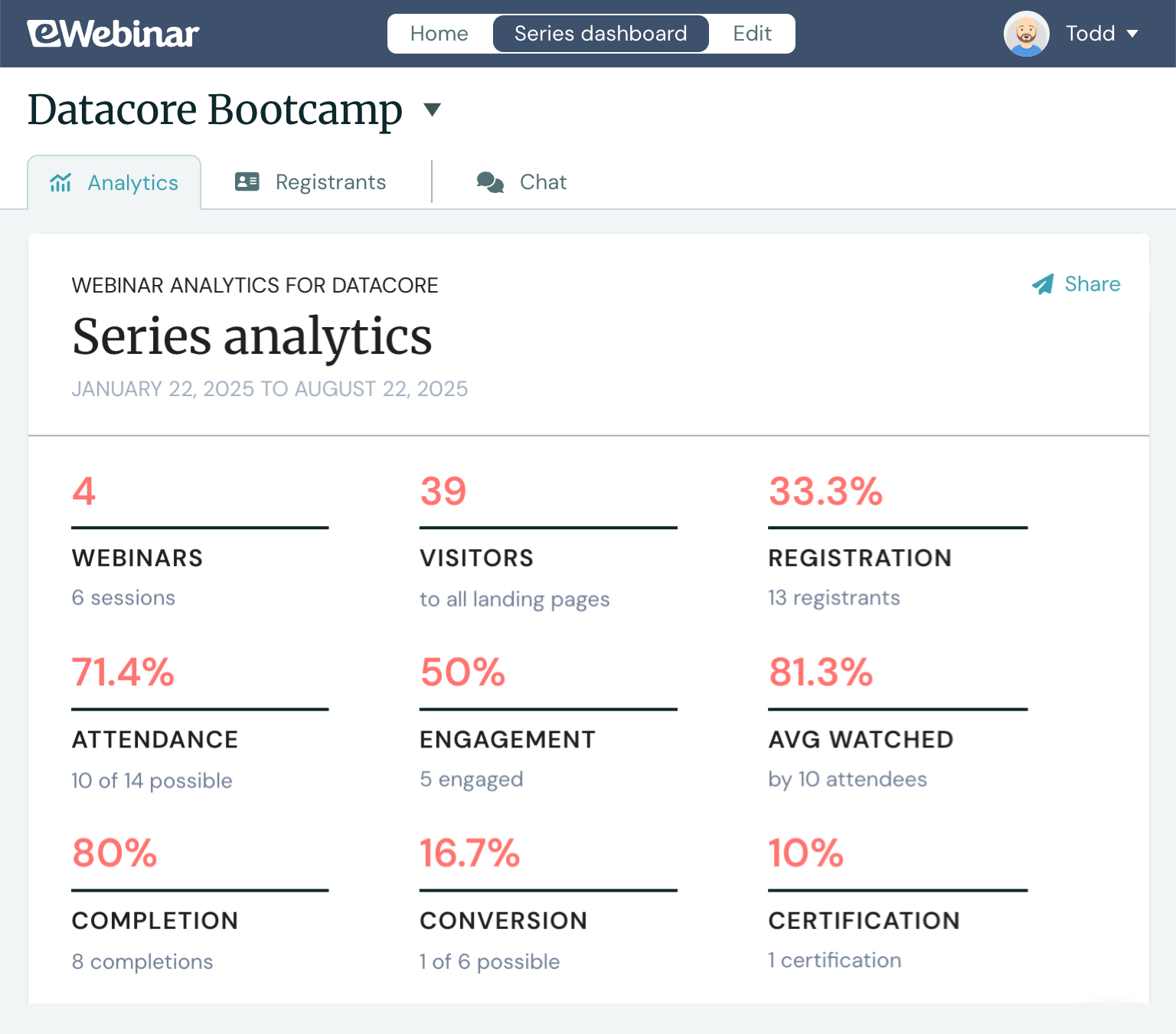
Each registrant’s activity and engagement analytics are tracked across webinars, allowing you to monitor everybody’s journey through the series.
These details let you see whether registrants are actually attending your series (and completing the entire course), watching webinars through to the end, and engaging with them — allowing you to assess the effectiveness of each series and identify areas to improve and optimize them.
The Universal Dashboard also lets you manage and respond to participant chats effectively. The centralized inbox allows you to view chats from all participants in one place — regardless of which webinar they’re watching — and see which ones still need a reply. All moderators can respond from here, allowing them to work in parallel and avoid duplicate replies.
Our Webinar Series tool is designed to support teams who need to deliver structured, repeatable training at scale. Some popular use cases include:
SaaS onboarding and customer training teams — Automate product onboarding for new customers, create feature-specific trainings for different user segments (beginner vs. advanced), or build separate series for different products in your suite.
Teams that manage complex products — Break down training by product area, line (for suites of products), or feature set, letting users dive deep into specific parts of your platform.
Enterprise companies with multiple customer segments — Build white-labeled training series for different enterprise customers, allowing each organization to access branded content tailored to their specific needs.
Educational institutions and e-learning providers — Deliver automated, trackable courses with self-paced learning paths, completion certificates, and analytics to monitor student progress.
International teams with global audiences — Create separate series for different languages or regions, ensuring every audience gets training in their preferred language.
The flexibility of Webinar Series means you can customize your approach based on audience needs — whether that's segmenting by experience level, product line, customer type, location, or any other factor that matters to your training goals.
If you’re not doing repetitive trainings and it makes sense to host your webinar series live, you may consider BigMarker, Zoho Webinar, or ON24.
BigMarker: This events platform is built for hosting live webinars, virtual events, and multi-session series like summits or courses. It offers a clear "Series" feature where attendees register once and gain access to all sessions.
You can host live, automated, or on-demand webinars within a series, and presenters can engage audiences with live polls, Q&A sessions, screen sharing, and handouts.
BigMarker also supports certificates of completion and provides marketing automation integrations with tools like HubSpot and Salesforce.
Read more about BigMarker here.
Zoho Webinar: Zoho's webinar platform supports recurring webinar series with flexible registration options — attendees can register once for all sessions or individually for each event.
It includes engagement features like live polls, Q&A sessions, screen sharing, and the ability to share handouts during sessions. Zoho also offers customizable registration pages and integrates with Zoho's broader suite of marketing tools.
It's a solid choice for teams already using the Zoho ecosystem who want to host live training events.
Read more about Zoho Webinar here.
ON24: ON24 is an enterprise-grade virtual events platform designed for large-scale trainings. It supports multi-session virtual events with breakout rooms, networking lounges, and 20+ engagement tools including live polls and Q&A.
ON24 offers powerful analytics and marketing automation integrations, making it popular with B2B marketing teams who want to repurpose webinar content and track audience engagement across campaigns.
eWebinar's Webinar Series is the only solution that gives you complete control over automated, multi-webinar training experiences. With mandatory progression controls, asynchronous chat, completion certificates, personalized participant hubs, and comprehensive analytics, you can deliver structured learning at scale.
So whether you're onboarding new customers, training employees, delivering compliance certifications, or creating educational courses, Webinar Series is your all-in-one webinar solution.
Ready to see how Webinar Series can transform your training workflows? Start a 14-day free trial to build your first series.
If you want to explore eWebinar’s complete feature set and discover the many benefits of automated webinars, you can join our free demo below (to watch instantly or schedule a later session).
Related reads:
Commencez votre essai gratuit de 14 jours dès aujourd'hui !